← Zeta
GeliştiricilerDevelopers

ZetaHubKitZetaHubKit

ZetaHubKit

Zeta için hub yaz. Uygulaman hub'ı tarif eder, Zeta onu çizer.
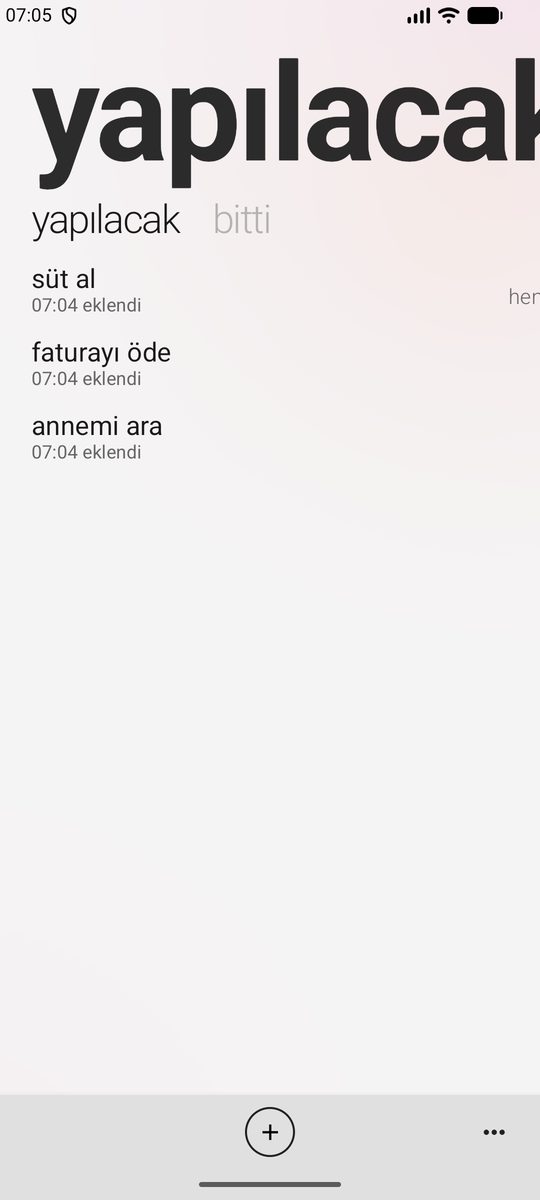
Aura'da açık bir hub: büyük başlık, iki sayfa, satırlar
Aura'da: listedeki ad uçup başlık olur
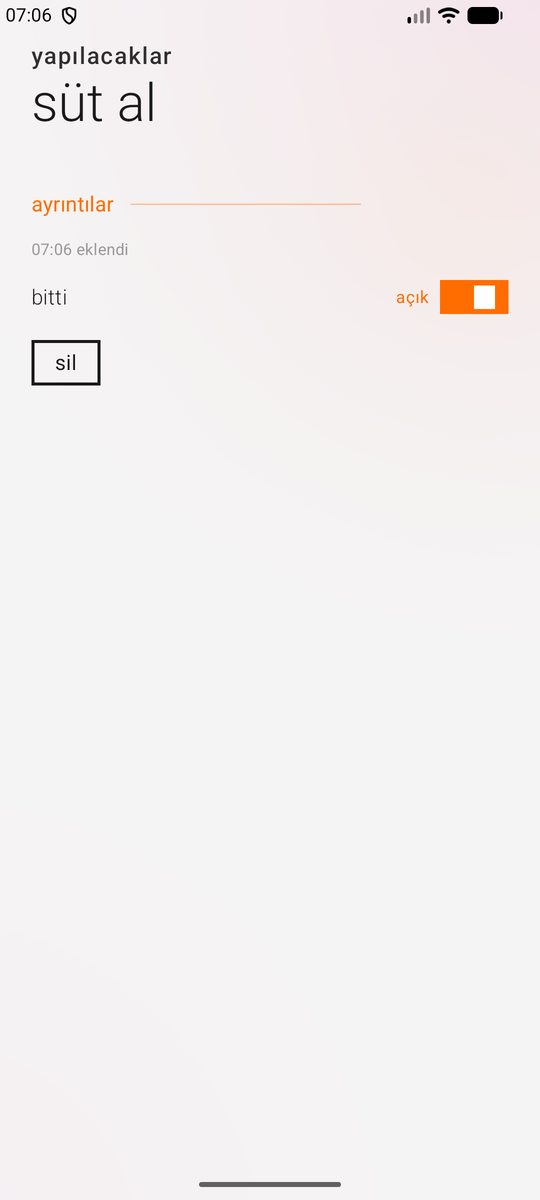
Hub'ın üstünde açılan bir alt sayfa
bir satıra dokununca açılan alt sayfa
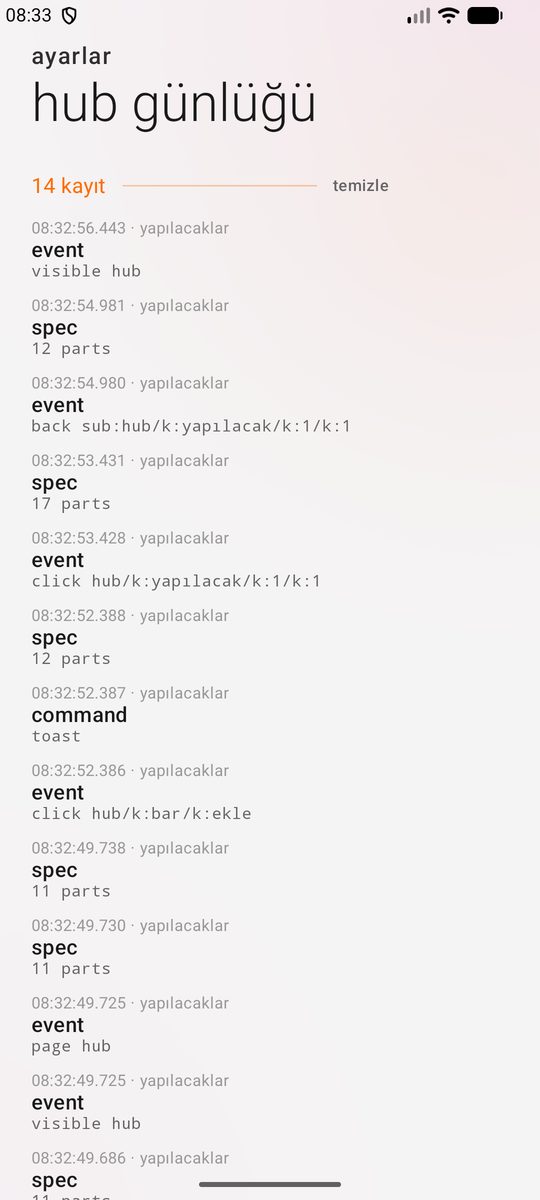
Geliştirici modunda hub günlüğü
geliştirici modunda hub günlüğü

Kısaca

Zeta bir başlatıcıdan çok bir arayüz paketi; ZetaHubKit onu başkalarının da hub ekleyebildiği bir platform yapıyor. Hub'ın normal bir Android uygulamasında yaşar. O uygulama Zeta'ya ekranı değil tarifini verir: sayfaları, listeleri, düğmeleri, alt çubuğu, canlı karosu. Zeta bu tarifi kendi parçalarıyla çizer:

  • telefonda kaydırılan sayfalar,
  • tablette solda başlıklar, yanda bölme,
  • Aura'da listeden uçan büyük başlık,
  • Mozaik'te bir karo.
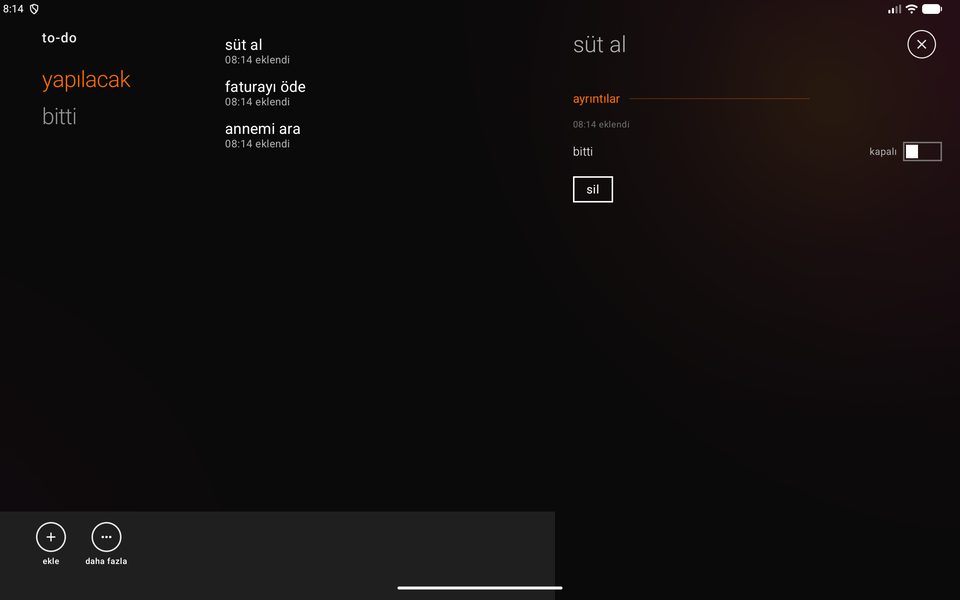
Tablette bir dış hub: başlıklar solda, sayfa yanında, alt sayfa bölmede

Böylece hub, Zeta'nın kendi hub'larından ayırt edilmez, ve sen dört ayrı düzen yazmazsın. Dokunuşlar senin uygulamana geri gelir; kodun her zaman kendi uygulamanda, kendi izinleriyle çalışır.

ZetaHubKit Apache 2.0 lisanslıdır; ücretsiz ya da ücretli, açık ya da kapalı kaynak hub yazabilirsin. Dış hub'lar Zeta'nın ücretsiz sürümünde de çalışır.

1. Projeye ekle

dependencies {
    implementation("io.github.serkantkn:zetahubkit:0.1.0")
}

İlk sürüm Maven Central'a hazırlanıyor. O zamana kadar depoyu klonlayıp ./gradlew :hubkit:publishToMavenLocal çalıştır ve projene mavenLocal() ekle. En az Android 9 (API 28) gerekir; Kotlin 2.0 ve üstüyle çalışır.

2. Manifeste servisi ekle

<service
    android:name=".TodoHub"
    android:exported="true"
    android:icon="@drawable/ic_todo"
    android:label="@string/hub_name">
    <intent-filter>
        <action android:name="com.serkantkn.zeta.action.HUB" />
    </intent-filter>
    <meta-data android:name="com.serkantkn.zeta.hub.protocol" android:value="1" />
</service>
  • android:label hub'ın adıdır: küçük harfle, kısa ("yapılacaklar", "kargolarım").
  • android:icon tek renkli tek bir şekil olsun; karonun mürekkebiyle boyanır. Vermezsen adın ilk harfi kullanılır.
  • Uygulamanın başka bir ekranı olması gerekmez.

3. Hub'ı tarif et

class TodoHub : ZetaHubService() {

    private var tasks by mutableHubStateOf(listOf(Task(1, "süt al")))   // değişince hub yeniden tarif edilir

    override fun hub(): HubSpec = zetaHub {
        page(getString(R.string.page_open)) {
            val open = tasks.filter { !it.done }
            if (open.isEmpty()) empty(getString(R.string.nothing_to_do))
            list(open, key = { it.id }) { task ->
                item(task.title, subtitle = task.note, opens = { taskPage(task.id) })
            }
        }
        page(getString(R.string.page_done)) { /* … */ }

        bar {
            action(getString(R.string.add), HubIcon.ADD) { add() }
            menu(getString(R.string.clear_done)) { tasks = tasks.filterNot { it.done } }
        }

        liveTile {
            count = tasks.count { !it.done }
            line = tasks.firstOrNull { !it.done }?.title
        }
    }

    private fun taskPage(id: Int) = subPage(title = find(id).title, key = "task$id") {
        section(getString(R.string.details))
        switch(getString(R.string.done), checked = find(id).done) { checked -> setDone(id, checked) }
        button(getString(R.string.delete)) { delete(id); closeSubPage() }
    }
}

hub() her olaydan sonra, mutableHubStateOf ile tuttuğun bir değer değişince ve invalidate() çağırınca yeniden çalışır; ZetaHubKit yeni tarifi Zeta'ya gönderir. Çalışan örneğin tamamı depoda: hubkit/sample.

4. Öğeler

ÖğeNe işe yarar
page(heading) { }Bir başlığın sayfası. Telefonda kaydırılır, tablette solda listelenir.
item(title, subtitle, meta, image, count, opens, onLongClick, onClick)Liste satırı. opens bir alt sayfa açar; Aura'da satırın başlığı o sayfanın başlığı olur.
list(items, key) { }Değişen bir liste; key her satırın yerini korur.
section(title, actionLabel) { }Bölüm başlığı, sonunda isteğe bağlı bir bağlantı.
text(text, style)Metin: TITLE, BODY ya da CAPTION.
button(label) { }Düğme.
switch(title, checked, subtitle) { }Anahtar.
value(title, value) { }Bir ayar ve değeri.
empty(message, actionLabel) { }Boş sayfa.
notice(message, actionLabel) { }Kendi satırında bir uyarı.
loading()Yükleniyor noktaları.
bar { action(label, icon) { }; menu(label) { } }Alt çubuk: en çok dört simgeli komut, sınırsız menü.
takeover { }Sayfaların yerine tek bir ekran (giriş yap, izin ver gibi).
subPage(title, key) { }Hub'ın üstünde açılan sayfa; telefonda kayarak gelir, tablette bölmede durur.
liveTile { count; line; title }Karonun ve Aura satırının söyledikleri.

Servisin içinden: openSubPage(page), closeSubPage(), toast(text), openUrl(url) (yalnız https, Zeta'nın internet hub'ında), share(text), closeHub(). Resimler content:// (ZetaHubKit, Zeta'ya okuma iznini kendisi verir) ya da https:// olur.

Bir öğeye ihtiyacın varsa (harita, grafik, oynatıcı…) bir issue aç. Öğeler ihtiyaca göre eklenir; eski hub'lar her zaman çalışmaya devam eder.

5. Canlı karo
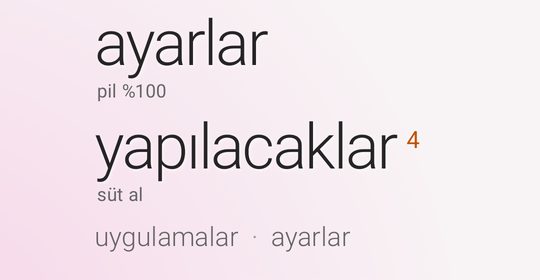
Aura listesinde sayı ve satırıyla bir dış hub
Aura'da sayı ve satır
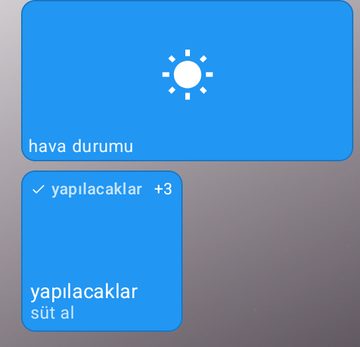
Mozaik'te bir dış hub'ın karosu
Mozaik'te karonun arka yüzü

Hub açıkken liveTile { } yeter. Hub kapalıyken bir şey değişirse (bir iş, bir bildirim, bir alarm):

// servisin içinden: tarifteki liveTile'ı gönderir
publishTile()

// ya da herhangi bir yerden
ZetaTiles.update(context, TodoHub::class.java) {
    count = 3
    line = "süt al"
}

Zeta bunu yalnızca kullanıcının eklediği bir hub için, yalnızca o hub'ın uygulamasından ve dakikada en çok dört kez kabul eder.

6. Dil

Zeta'nın dili telefonunkinden farklı olabilir. Zeta bağlıyken servisin kaynakları Zeta'nın dilindedir: getString hub'ın metinlerini doğru dilde verir. Tarih ve sayıları hubLocale ile biçimlendir.

7. Dene

  1. Telefona Zeta'yı (buradan) ve hub uygulamanı kur.
  2. Zeta'da ayarlar › hub › diğer uygulamaların hub'ları bölümünde hub'ını aç; ya da Aura listesine uzun basıp hub ekle'yi kullan.
  3. Aynı yerde geliştirici modunu aç. Hub günlüğü:
    • bağlantıları, gelen her tarifi (kaç parça olduğuyla), dokunuşları ve komutları gösterir;
    • tariflerdeki hataları ve uyarıları kırmızıyla işaretler.

Hub ekleme penceresi: hub'ın adı, geldiği uygulama ve verilerin paylaşılmadığı notu

Tarifini kendi testinde de denetleyebilirsin (Robolectric ile):

@RunWith(RobolectricTestRunner::class)
class TodoHubTest {
    @Test fun describesItselfCleanly() {
        val hub = Robolectric.buildService(TodoHub::class.java).create().get()
        assertEquals(emptyList<Any>(), hub.validate())
    }
}

8. Kurallar ve güvenlik

  • Kod Zeta'ya girmez. Zeta yalnızca tarifi okur; tarifte çalışan hiçbir şey yoktur. Hub'ın kodu kendi uygulamasında çalışır.
  • Kullanıcı onaylamadan hub eklenmez. Onay uygulamanın imzasına bağlıdır; başka bir imzayla gelen sürüm açılmaz.
  • Veri tek yönlü akar. Zeta hub'a kişileri, mesajları ya da başka bir veriyi vermez. Neye ihtiyacın varsa izni kendi uygulamanda iste.
  • Hub yalnızca Zeta ile konuşur. Yayın sürümü (debuggable olmayan) yalnızca imzalı Zeta'ya yanıt verir; geliştirirken (debuggable) her Zeta yapısına yanıt verir.
  • Sınırlar:
    • bir tarif en çok 4000 parça olabilir;
    • uygulama ilk tarifini 5 saniye içinde vermelidir;
    • kapalıyken karo dakikada en çok 4 kez yazılabilir.
    Uygulama çökerse Zeta "açılamıyor · yeniden dene" der ve çalışmaya devam eder.
  • İlk sürümde dış hub'lar televizyonda sunulmaz.

Kaynak ve lisans

ZetaHubKit'in kaynağı ve örneği depoda: hubkit/. ZetaHubKit Apache Lisansı 2.0 ile yayınlanır; Zeta'nın kendisi kapalı kaynaktır.

English · Zeta

ZetaHubKit

Write a hub for Zeta. Your app describes it; Zeta draws it.

A hub open in Aura: the big title, two pages, lines
in Aura: the name in the list flies up to become the title
A sub-page open over the hub
a sub-page, opened by touching a line
The hub log in developer mode
the hub log in developer mode

In short

Zeta is an interface suite rather than a launcher, and ZetaHubKit makes it a platform others can add hubs to. Your hub lives in an ordinary Android app. That app gives Zeta not a screen but a description: pages, lists, buttons, the bar, the live tile. Zeta draws it with its own parts:

  • pages you swipe on a phone,
  • headings on the left and a pane beside them on a tablet,
  • the big title flying up from the list in Aura,
  • a tile in Mosaic.
An external hub on a tablet: headings on the left, the page beside them, a sub-page in the pane

So the hub cannot be told from Zeta's own, and you do not write four layouts. Touches come back to your app; your code always runs in your own app, with its own permissions.

ZetaHubKit is Apache 2.0: free or paid, open or closed source. Other apps' hubs work in Zeta's free edition too.

1. Add it to your project

dependencies {
    implementation("io.github.serkantkn:zetahubkit:0.1.0")
}

The first release is being prepared for Maven Central. Until then, clone the repository, run ./gradlew :hubkit:publishToMavenLocal and add mavenLocal() to your project. Android 9 (API 28) or later; Kotlin 2.0 or later.

2. Declare the service

<service
    android:name=".TodoHub"
    android:exported="true"
    android:icon="@drawable/ic_todo"
    android:label="@string/hub_name">
    <intent-filter>
        <action android:name="com.serkantkn.zeta.action.HUB" />
    </intent-filter>
    <meta-data android:name="com.serkantkn.zeta.hub.protocol" android:value="1" />
</service>
  • android:label is the hub's name: lowercase and short ("to-do", "my parcels").
  • android:icon should be one single-colour shape; it is filled with the tile's ink. Without one, the name's first letter is used.
  • The app needs no other screen.

3. Describe the hub

class TodoHub : ZetaHubService() {

    private var tasks by mutableHubStateOf(listOf(Task(1, "buy milk")))   // changing it describes the hub again

    override fun hub(): HubSpec = zetaHub {
        page(getString(R.string.page_open)) {
            val open = tasks.filter { !it.done }
            if (open.isEmpty()) empty(getString(R.string.nothing_to_do))
            list(open, key = { it.id }) { task ->
                item(task.title, subtitle = task.note, opens = { taskPage(task.id) })
            }
        }
        page(getString(R.string.page_done)) { /* … */ }

        bar {
            action(getString(R.string.add), HubIcon.ADD) { add() }
            menu(getString(R.string.clear_done)) { tasks = tasks.filterNot { it.done } }
        }

        liveTile {
            count = tasks.count { !it.done }
            line = tasks.firstOrNull { !it.done }?.title
        }
    }

    private fun taskPage(id: Int) = subPage(title = find(id).title, key = "task$id") {
        section(getString(R.string.details))
        switch(getString(R.string.done), checked = find(id).done) { checked -> setDone(id, checked) }
        button(getString(R.string.delete)) { delete(id); closeSubPage() }
    }
}

hub() runs again after every event, whenever a value kept with mutableHubStateOf changes, and when you call invalidate(); ZetaHubKit sends the new description to Zeta. The whole working example is in the repository: hubkit/sample.

4. Parts

PartWhat it is for
page(heading) { }A heading's page. Swiped on a phone, listed on the left on a tablet.
item(title, subtitle, meta, image, count, opens, onLongClick, onClick)A line of a list. opens opens a sub-page; in Aura the line's title becomes that page's title.
list(items, key) { }A changing list; key keeps each line in its place.
section(title, actionLabel) { }A heading, with an optional link at its end.
text(text, style)Words: TITLE, BODY or CAPTION.
button(label) { }A button.
switch(title, checked, subtitle) { }A switch.
value(title, value) { }A setting and its value.
empty(message, actionLabel) { }An empty page.
notice(message, actionLabel) { }A word to the person, on a line of its own.
loading()The loading dots.
bar { action(label, icon) { }; menu(label) { } }The bar: up to four commands with glyphs, any number in the menu.
takeover { }One screen in place of the pages (sign in, allow something).
subPage(title, key) { }A page over the hub; slides in on a phone, stands in the pane on a tablet.
liveTile { count; line; title }What the tile and the line in Aura say.

From the service: openSubPage(page), closeSubPage(), toast(text), openUrl(url) (https only, in Zeta's internet hub), share(text), closeHub(). Pictures are content:// (ZetaHubKit lets Zeta read them) or https://.

Need a part that is not here (a map, a chart, a player…)? Open an issue. Parts are added as hubs need them, and older hubs always keep working.

5. Live tile

An external hub with its count and line in the Aura list
count and line in Aura
An external hub's tile in Mosaic
the tile's back in Mosaic

While the hub is open, liveTile { } is enough. When something changes while it is closed (a job, a push, an alarm):

// inside the service: sends the description's liveTile
publishTile()

// or from anywhere
ZetaTiles.update(context, TodoHub::class.java) {
    count = 3
    line = "buy milk"
}

Zeta takes it only for a hub the person has added, only from that hub's app, and at most four times a minute.

6. Language

Zeta's language may not be the phone's. While Zeta is connected, the service's resources are in Zeta's language: getString gives the hub's words in the right one. Format dates and numbers with hubLocale.

7. Try it

  1. Install Zeta (from here) and your hub app on a phone.
  2. In Zeta, switch your hub on under settings › hub › other apps' hubs, or long-press the Aura list and use add a hub.
  3. Switch on developer mode in the same place. The hub log:
    • shows connections, every description that arrives (with how many parts), touches and commands;
    • marks errors and warnings in the descriptions.
The add-a-hub window: the hub's name, the app it comes from, and the note that no data is shared

You can check your description in a test of your own too (with Robolectric):

@RunWith(RobolectricTestRunner::class)
class TodoHubTest {
    @Test fun describesItselfCleanly() {
        val hub = Robolectric.buildService(TodoHub::class.java).create().get()
        assertEquals(emptyList<Any>(), hub.validate())
    }
}

8. Rules and safety

  • No code goes into Zeta. Zeta only reads the description; nothing in it runs. The hub's code runs in its own app.
  • No hub is added without the person's say. The approval is tied to the app's signature; a build signed by someone else does not open.
  • Data flows one way. Zeta gives a hub none of the person's contacts, messages or anything else. Ask for what you need in your own app.
  • A hub talks only to Zeta. A release (non-debuggable) build answers only signed Zeta builds; while developing (debuggable) it answers any Zeta build.
  • Limits:
    • a description may have at most 4000 parts;
    • the app must give its first description within five seconds;
    • while closed, a tile may be written at most four times a minute.
    If the app crashes, Zeta says the hub cannot open and offers to try again, and carries on.
  • In the first version, other apps' hubs are not offered on a television.

Source and licence

ZetaHubKit's source and the example are in the repository: hubkit/. ZetaHubKit is released under the Apache License 2.0; Zeta itself is closed source.

Türkçe · Zeta